 VinciPhoto
Search your photos by description
Type what you remember, like “snow”, “receipts” or “dog on the beach”, and VinciPhoto finds matching photos. It looks at what your photos show, so you don't need a filename, date or album. Search runs on your device and works in all 11 languages the app supports.
Download on the App Store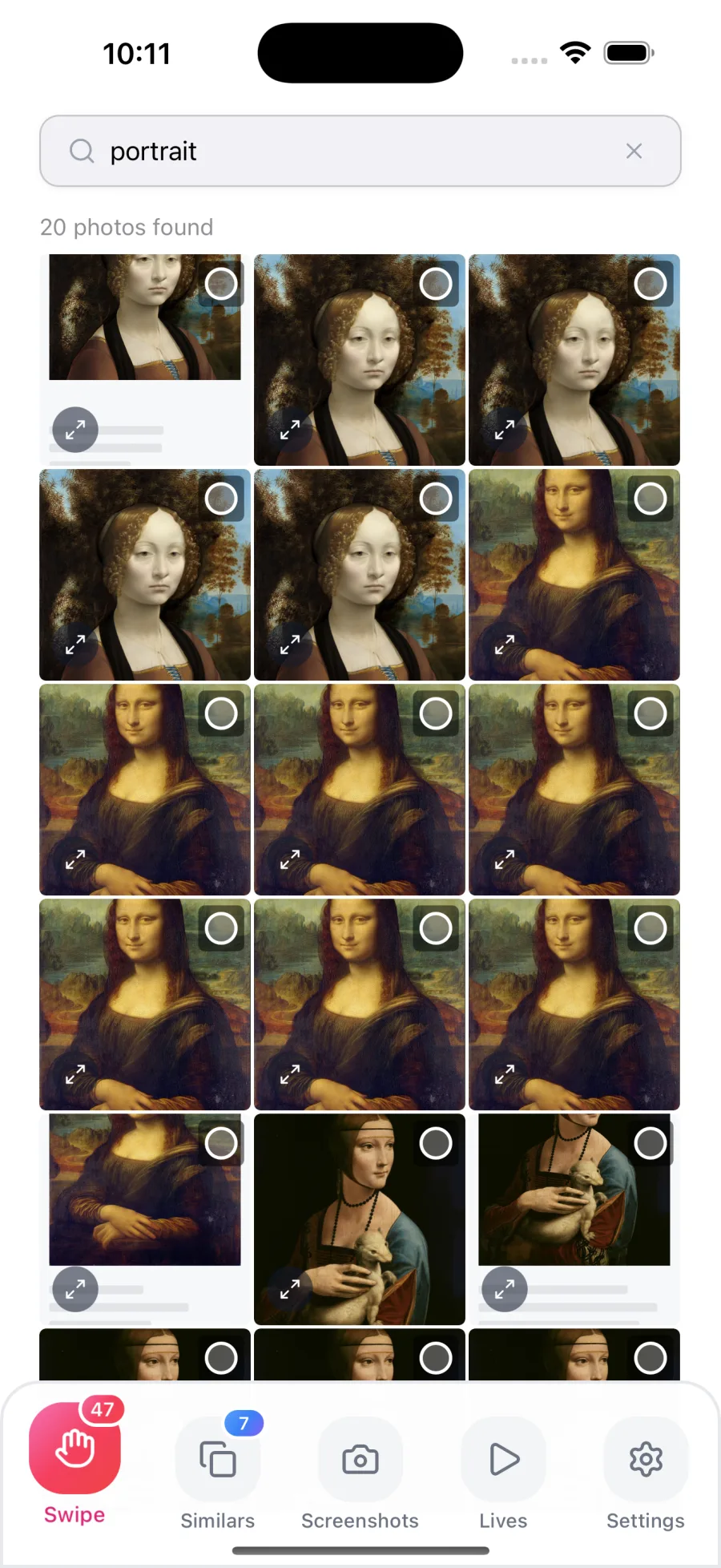
What you can search for
- Things: “receipts”, “my passport”, “birthday cake”
- Scenes: “snow”, “sunset over the water”, “dog on the beach”
- Kinds of photo: “portrait”, “handwritten notes”
How it works
When VinciPhoto scans your library, an on-device vision model turns each photo into a list of numbers that describes what it shows. When you search, a matching text model does the same for your words, and the app ranks photos by how closely the two match. Because this compares meaning, “dog on the beach” can find a photo even if no one ever tagged it. The same photo data powers similar photo grouping, as the engineering post explains.
Getting better results
- Describe what’s in the picture, in a few words.
- If you get too many results, add a detail: “red car” instead of “car”.
- Give the first scan time to finish, because photos that aren’t indexed yet won’t appear.
What search can’t do
Search finds photos that look like your description, so results are ranked matches and can include some near misses. It works best for things you can see in the photo. Details that aren’t visible, like who took a picture or why, won’t help.
Frequently asked questions
How can I search my photos by text?
Open VinciPhoto's search and type a description of the photo, such as "birthday cake" or "my passport". The app compares your words with what each photo shows and lists the closest matches. It builds its search index on your device during the first scan, so larger libraries take longer to become fully searchable.
Does photo search work offline?
Yes. Search runs on your device using models bundled inside the app, so it works with no signal. Your photos aren't sent anywhere to produce results. This also means search is available wherever you are, including on a plane or abroad without data.
Which languages can I search in?
You can search in all 11 languages VinciPhoto supports: English, German, Spanish, French, Italian, Japanese, Korean, Portuguese (Brazil), Russian, Simplified Chinese and Traditional Chinese. Type the description in your own language, and you'll get results the same way you would in English.
How is this different from search in the Photos app?
The Photos app also offers search and is a good place to start, especially for people, places and dates. VinciPhoto adds a second way to look, and it connects to cleanup: you can find photos by description, then review and delete them alongside your duplicates and screenshots.
Is photo search free?
Yes, the free plan includes 5 searches a day. Premium removes the limit, along with the limits on deletions and Live Photo conversions, and removes ads. Premium costs a one-time $4.99 in the US, or you can choose a monthly or yearly subscription. Prices vary by region.
Keep reading
Finding similar photos on device
How VinciPhoto groups near-identical photos on the device: one image embedding shared with search, a similarity graph per day, and a scan that paces itself.
Similar and duplicate photos
Find near-identical bursts and duplicate photos, keep the best shot in each group, and delete the rest. You confirm every delete, and analysis stays on your device.
Download VinciPhoto
Free to download. The full scan is never limited, so you can see how much space you could get back before you decide anything.
Download on the App Store