 VinciPhoto
Delete similar and duplicate photos, and keep the best shot
VinciPhoto is a duplicate photo finder that also catches near-identical shots. It groups photos of the same moment, puts the best one first and pre-selects the rest. You review each group and confirm the delete, and the analysis stays on your device.
Download on the App Store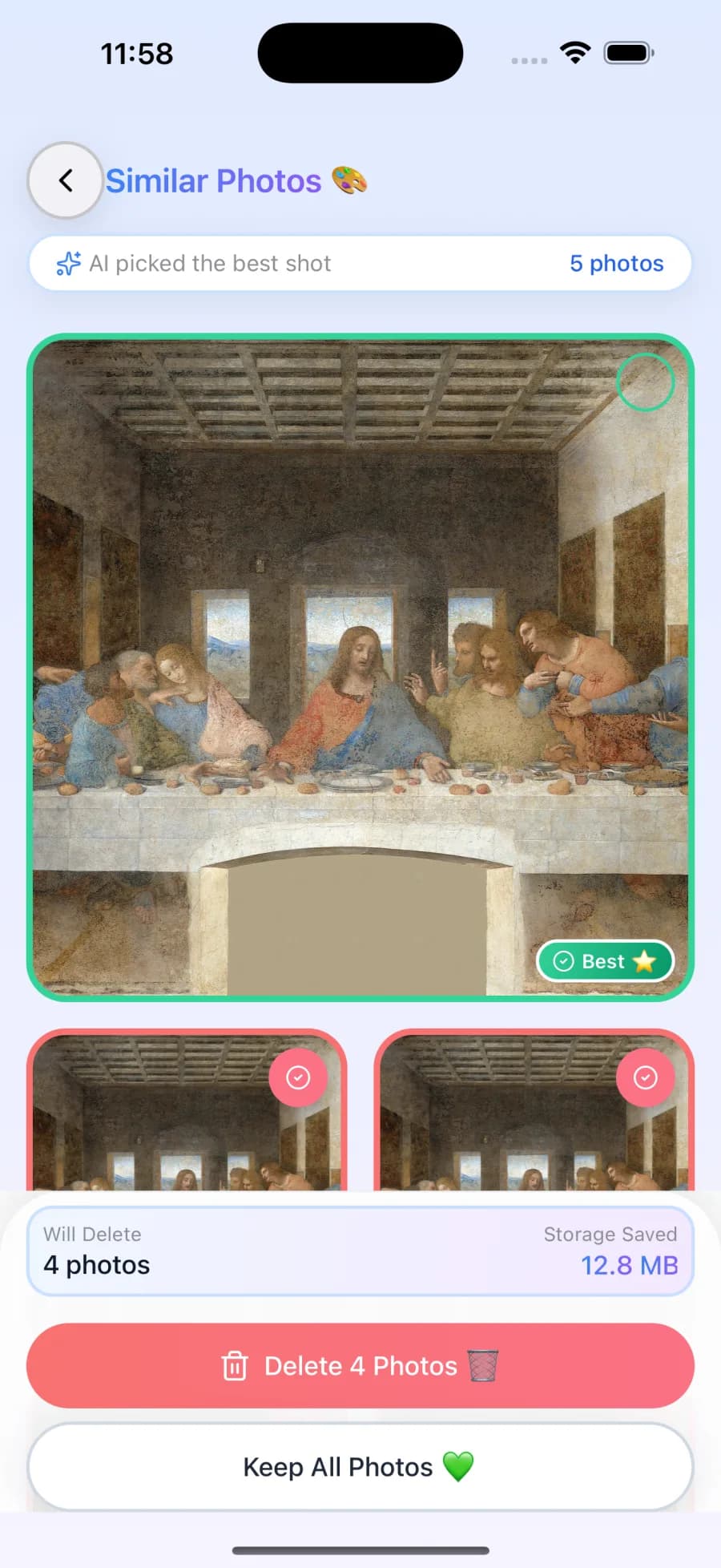
How to delete similar photos with VinciPhoto
- Run the scan. VinciPhoto reads your library on the device. The scan is never limited, even on the free plan, and continues in the background on large libraries.
- Open a group. Each group holds shots of the same moment, with the suggested best photo first and a short reason why it was chosen.
- Check the selection. The other photos are pre-selected. Tap any photo to enlarge it or change whether it stays.
- Confirm the delete. The system Photos prompt asks you to confirm. Deleted photos stay in Recently Deleted for 30 days.
Why duplicate finders miss so many photos
Most of the clutter in a camera roll isn’t exact copies. It’s the six shots you took to get one good group photo. Those frames differ slightly, so a tool that looks for identical images has nothing to match. VinciPhoto compares what the photos show using an on-device vision model, which is how it can tell that two frames are the same scene. The engineering post explains how this works.
What VinciPhoto finds
| Type of photo | Example | Grouped? |
|---|---|---|
| Burst shots | Ten frames of a kid jumping | Yes |
| Retakes | Five tries at the same group photo | Yes |
| Same-day copies | A photo saved twice on the same day | Yes |
| Same place, different day | The same view from two different trips | No, because the days differ |
You stay in control
VinciPhoto never removes a photo without your confirmation. Every delete goes through the system Photos prompt, undo is never limited on any plan, and Premium lets you adjust how closely photos must match before they’re grouped.
Already use the built-in Duplicates album? Read our comparison of the Duplicates album and a cleaner app.
Frequently asked questions
What's the difference between duplicate and similar photos?
A duplicate is a copy of the same image, such as a photo you saved twice. A similar photo is a different shot of the same moment, such as ten frames from a burst. Both take up storage, but simple duplicate matching usually misses similar photos because their pixels aren't the same.
How does VinciPhoto choose the best photo?
VinciPhoto scores every photo in a group on image quality and puts the winner first. It then shows why that one won: the sharpest shot, the clearest face and expression, or the best lighting and exposure. It's only a suggestion, so you can change which photos to keep before you delete anything.
Will it group photos taken on different days?
No. VinciPhoto compares photos taken on the same day, because near-identical shots almost always come from the same moment. This keeps groups focused and avoids matching similar-looking scenes from different occasions. A copy of an old photo saved on a later day may not be grouped with the original.
Can I delete all the similar photos at once?
Yes, with Smart Cleanup in Premium. It keeps the highest-quality photo from each group and removes the others in one step, after you review and confirm. On the free plan you work through groups yourself, with up to 50 deletions a day. Removed photos stay in Recently Deleted for 30 days.
Keep reading
Duplicates album vs. a cleaner app
What the built-in Duplicates album finds, what it leaves behind, and when a photo cleaner app is worth adding. An honest comparison, including when you don't need one.
Finding similar photos on device
How VinciPhoto groups near-identical photos on the device: one image embedding shared with search, a similarity graph per day, and a scan that paces itself.
Download VinciPhoto
Free to download. The full scan is never limited, so you can see how much space you could get back before you decide anything.
Download on the App Store